
Start with Room, Plate or Hall and shape the space from there.
 iLA Native FX · Windows · VST3
iLA Reverb
Give your voice a space of its own.
From an intimate room to a wider space for a big chorus, iLA Reverb helps you choose an atmosphere that fits the song. Start in Basic, then open Advanced when you want more control over the colour and movement of the reverb.
Made for Vocals, instruments and mixes that need a sense of space.
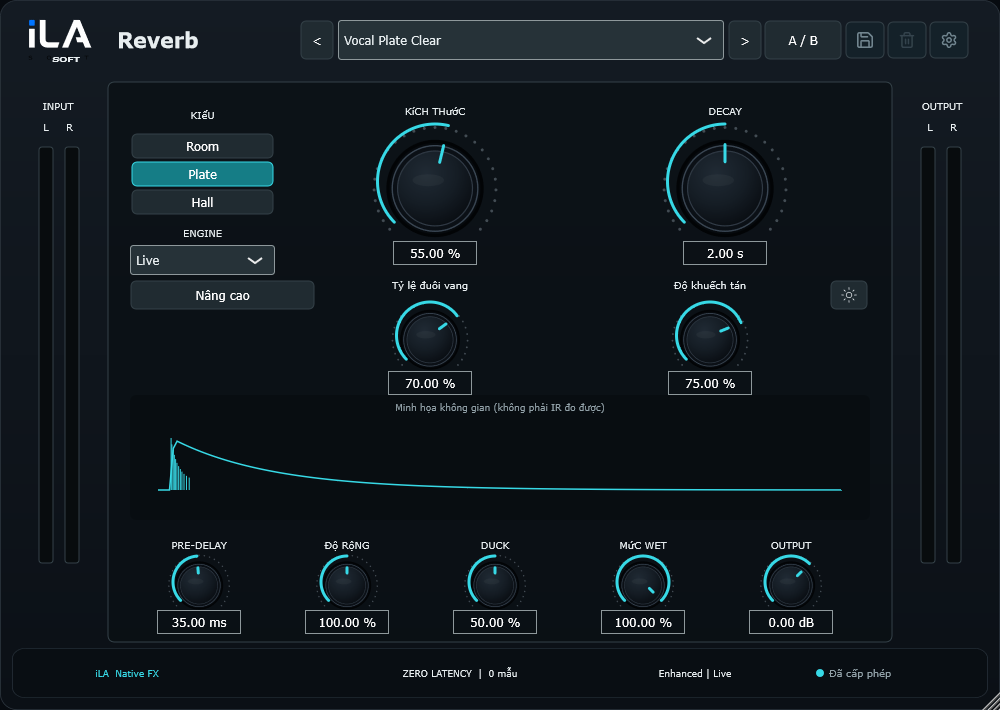
Make it sound like you
What you can do
Set the gap before the reverb, its length and its width to place the voice.
Use Duck to bring the reverb down under the words and back into the pauses.
Start simple
Make a small change. Listen. Find your balance.
Open the plugin in idolLiveAudio or a compatible VST3 host. Use your own voice and the music you plan to play to hear the difference.
- Choose a space that suits the mood of the song.
- Keep the tail short enough to leave room for the next phrase.
- Balance the reverb level and add Duck if the words need more space.
Find the main controls
Control labels may appear in English or Vietnamese, depending on the plugin language you choose.
Type PreDelay Decay Width Duck Wet Level Advanced
iLA Nexus
Get ready for your next session.
Sign in to iLA Nexus to check your licenses, install plugins and keep them up to date in one place.