
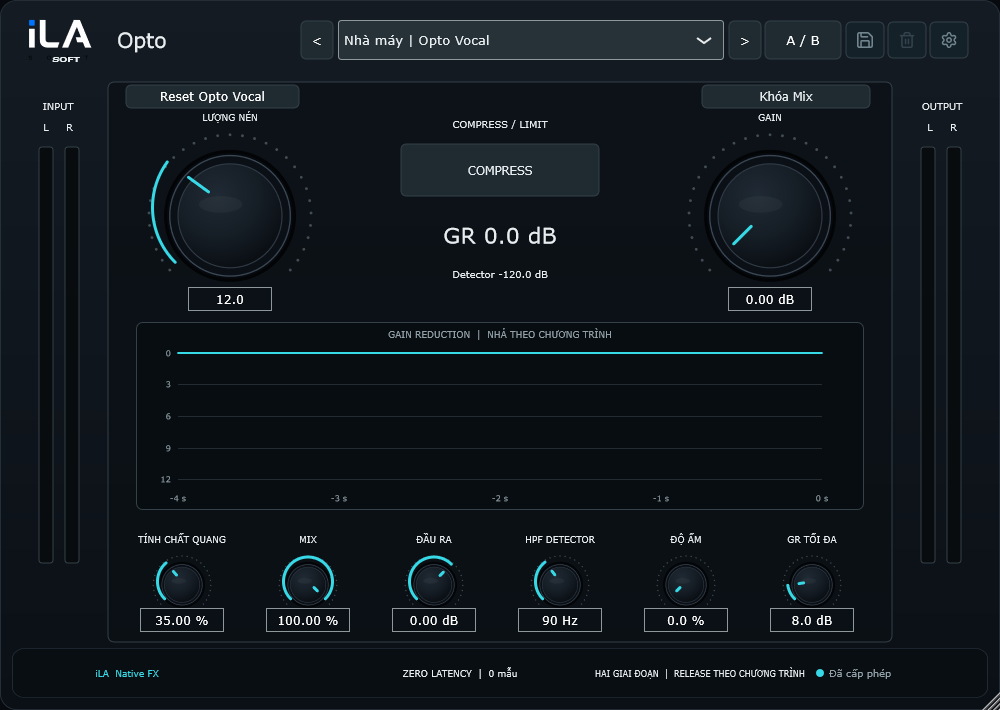
Start with two main controls: Peak Reduction and Gain.
 iLA Native FX · Windows · VST3
iLA Opto
A gentler touch for your vocal.
When you want a more even voice without an overly firm sound, iLA Opto offers an approachable way to smooth out the level. Set the reduction, balance the volume and add a little warmth if the song calls for it.
Made for Ballads, acoustic vocals, narration and gentle vocal leveling.
Make it sound like you
What you can do
Use Character for the recovery feel and the separate Warmth control for colour.
Choose a starting preset, compare with A/B and set a reduction limit with Max GR.
Start simple
Make a small change. Listen. Find your balance.
Open the plugin in idolLiveAudio or a compatible VST3 host. Use your own voice and the music you plan to play to hear the difference.
- Choose a suitable preset or start with Opto Vocal.
- Raise Peak Reduction until the louder phrases settle into place.
- Balance Gain, then try Warmth if you want a little extra colour.
Find the main controls
Control labels may appear in English or Vietnamese, depending on the plugin language you choose.
Peak Reduction Gain Character Warmth Max GR Mix
iLA Nexus
Get ready for your next session.
Sign in to iLA Nexus to check your licenses, install plugins and keep them up to date in one place.