
Four tone-shaping bands plus two controls for trimming the lowest and highest parts of the sound.
 iLA Native FX · Windows · VST3
iLA Music EQ
Give the backing track room to support your voice.
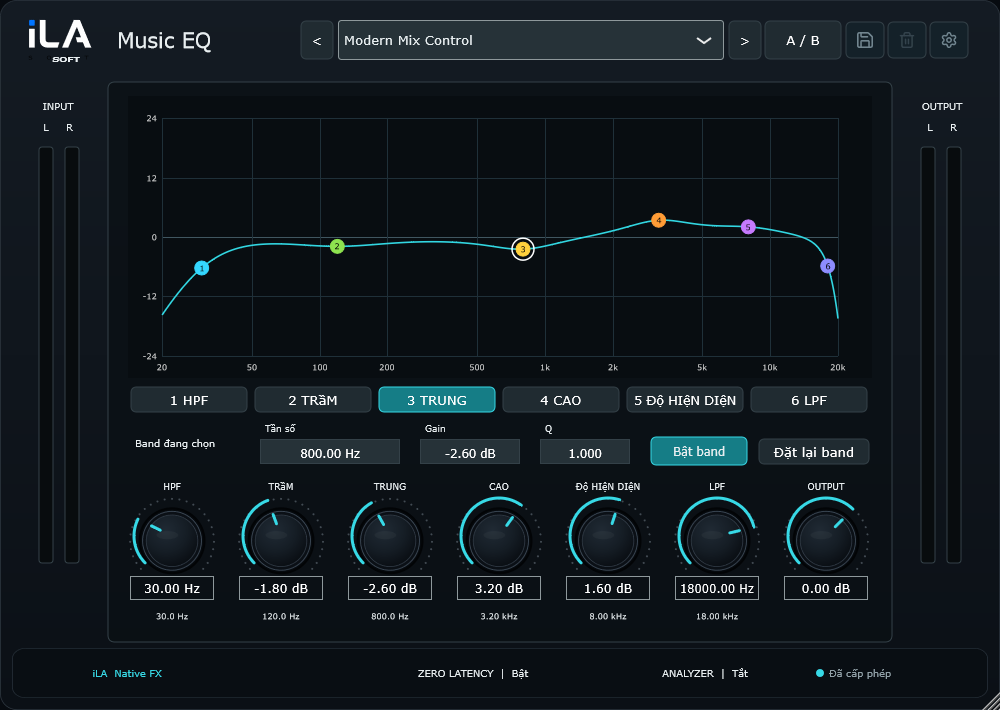
Some tracks feel bass-heavy. Others have a bright edge that competes with the singer. iLA Music EQ gives you six points to shape the music visually, so the backing track sits more comfortably around the voice.
Made for Karaoke tracks, livestream background music and stereo mixes.
Make it sound like you
What you can do
Drag sideways to pick a range, up or down to change its level, and scroll to adjust its width.
Every node follows the combined curve, including changes to Output.
Start simple
Make a small change. Listen. Find your balance.
Open the plugin in idolLiveAudio or a compatible VST3 host. Use your own voice and the music you plan to play to hear the difference.
- Listen to the track with the vocal and find where they compete.
- Lower that area a little, then check the bass and brightness.
- Compare with A/B and save the setting when the balance feels right.
Find the main controls
Control labels may appear in English or Vietnamese, depending on the plugin language you choose.
HPF Low Mid High Presence LPF Q Output
iLA Nexus
Get ready for your next session.
Sign in to iLA Nexus to check your licenses, install plugins and keep them up to date in one place.