
Choose how loud a sound needs to be before the voice comes through.
 iLA Native FX · Windows · VST3
iLA Gate
Quieter pauses. A clearer conversation.
A fan, room noise or an open microphone can fill the gaps between phrases. iLA Gate lowers that background sound during pauses and lets you choose how gently the microphone opens and closes.
Made for Spoken microphones, live vocals and voice recordings.
Make it sound like you
What you can do
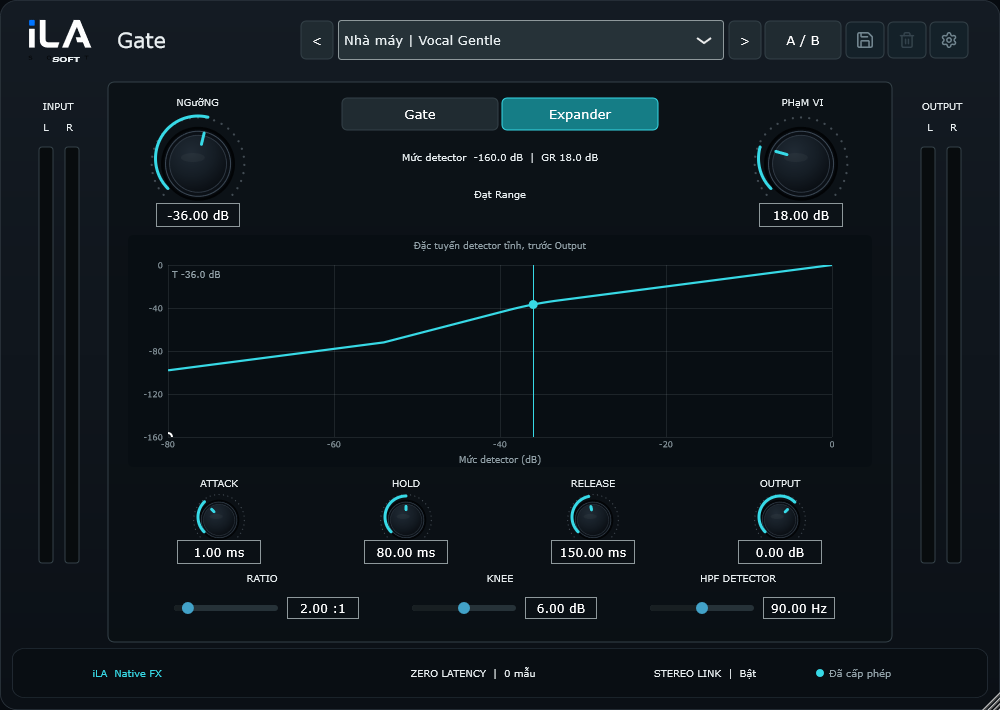
Adjust the waiting and closing times to keep the ends of words.
Watch the graph to see when background sound is being turned down.
Start simple
Make a small change. Listen. Find your balance.
Open the plugin in idolLiveAudio or a compatible VST3 host. Use your own voice and the music you plan to play to hear the difference.
- Pause and watch the level of the microphone's background noise.
- Set the threshold so your quieter words still come through.
- Read a few phrases and slow the closing time if the endings disappear.
Find the main controls
Control labels may appear in English or Vietnamese, depending on the plugin language you choose.
Threshold Range Attack Hold Release Mode
iLA Nexus
Get ready for your next session.
Sign in to iLA Nexus to check your licenses, install plugins and keep them up to date in one place.