
Keep echoes centred, spread them wide or send them from left to right.
 iLA Native FX · Windows · VST3
iLA Delay
Echoes that move with your music.
A short echo can give a vocal more presence. Longer repeats can turn the end of a phrase into a moment of its own. iLA Delay puts timing, repeat level and the direction of the echoes in one clear view.
Made for Singing, spoken introductions and creative echo effects.
Make it sound like you
What you can do
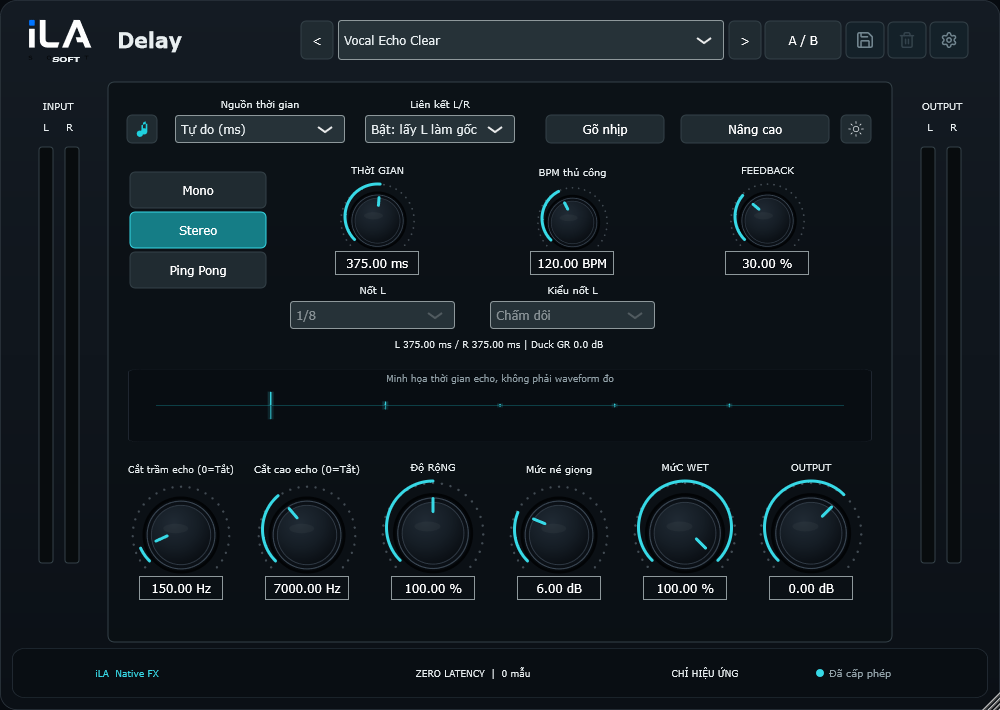
Match repeats to the song, enter a time or tap along with Tap tempo.
Use Duck to lower the echoes while you sing and let them return between phrases.
Start simple
Make a small change. Listen. Find your balance.
Open the plugin in idolLiveAudio or a compatible VST3 host. Use your own voice and the music you plan to play to hear the difference.
- Choose an echo pattern and timing that fit the song.
- Bring up the repeats, then adjust how bright or dark they sound.
- Add Duck if the echoes are getting in the way of the words.
Find the main controls
Control labels may appear in English or Vietnamese, depending on the plugin language you choose.
Time Tap tempo Feedback Width Duck Wet Level
iLA Nexus
Get ready for your next session.
Sign in to iLA Nexus to check your licenses, install plugins and keep them up to date in one place.