
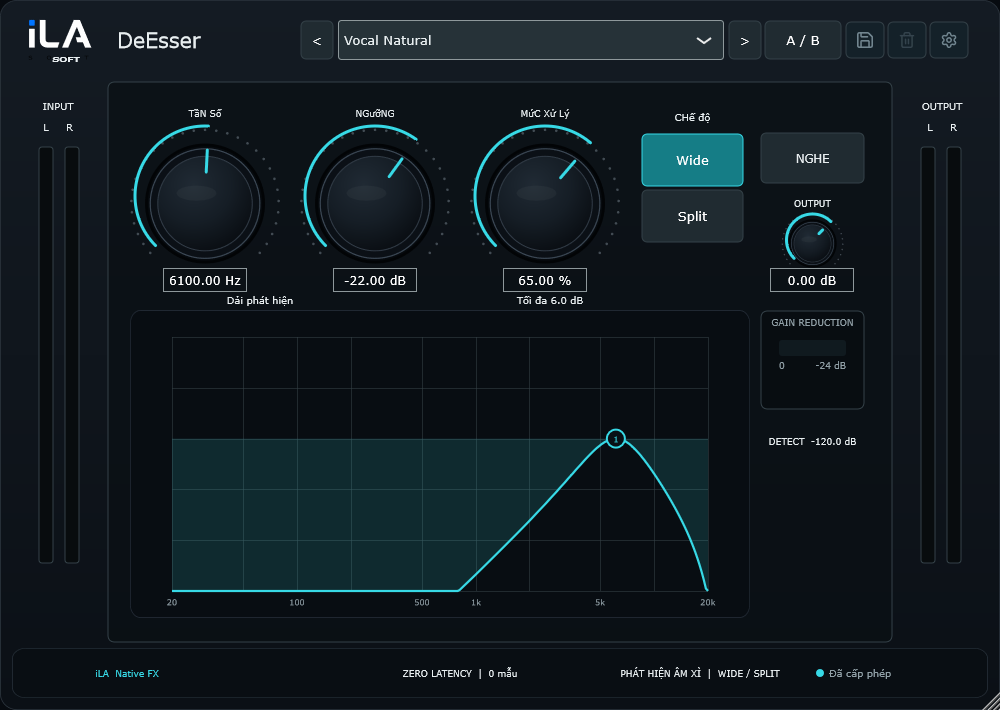
Use Listen to hear the area you are targeting and find the sharpness.
 iLA Native FX · Windows · VST3
iLA DeEsser
Softer S sounds. Clearer listening.
A bright vocal can also bring out sharp S sounds and breathy edges. iLA DeEsser helps turn those moments down as they happen, so you can keep the voice bright without making every word feel sharp.
Made for Singing, podcasts and spoken recordings with prominent sibilance.
Make it sound like you
What you can do
Choose broader softening or processing focused on the high frequencies.
Watch the reduction and adjust Amount until the sharp sounds feel more comfortable.
Start simple
Make a small change. Listen. Find your balance.
Open the plugin in idolLiveAudio or a compatible VST3 host. Use your own voice and the music you plan to play to hear the difference.
- Speak or sing a phrase with several S sounds.
- Use Listen to locate the sharp area, then turn Listen off.
- Set the threshold and Amount gently, checking that the words remain clear.
Find the main controls
Control labels may appear in English or Vietnamese, depending on the plugin language you choose.
Frequency Threshold Amount Mode Listen Output
iLA Nexus
Get ready for your next session.
Sign in to iLA Nexus to check your licenses, install plugins and keep them up to date in one place.