
Analyse the music for a key and major/minor suggestion.
 iLA Native FX · Windows · VST3
iLA AutoKey
A starting point for finding the song's key.
Not sure which key your backing track is in? Let iLA AutoKey listen, review its key and scale suggestion, then decide whether to send it to iLA Pitch. The music passing through keeps its original pitch.
Made for Preparing backing tracks and setting up vocal pitch correction.
Make it sound like you
What you can do
Review confidence and nearby alternatives before making a choice.
Send the result to iLA Pitch through the supported connection.
Start simple
Make a small change. Listen. Find your balance.
Open the plugin in idolLiveAudio or a compatible VST3 host. Use your own voice and the music you plan to play to hear the difference.
- Put AutoKey on the music path and play a section with a clear melody.
- Start the analysis and review the result and confidence.
- Check the suggestion against the song before sending it to the vocal tuner.
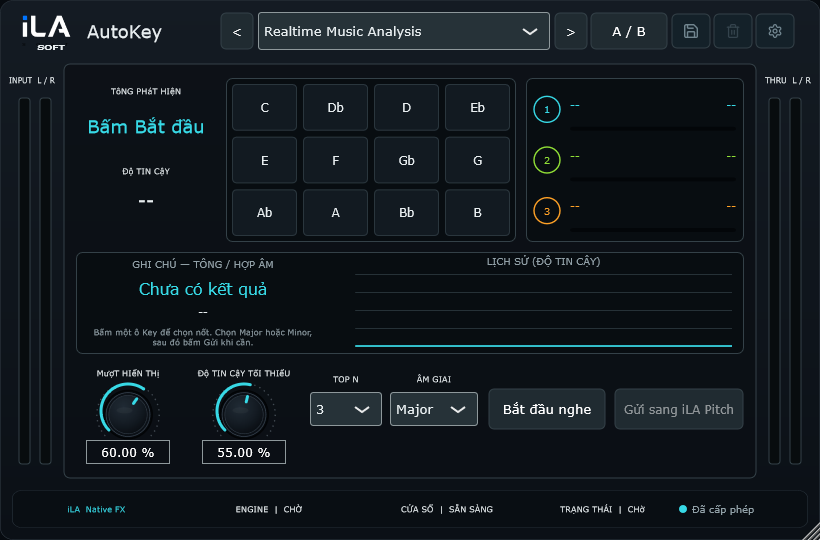
Find the main controls
Control labels may appear in English or Vietnamese, depending on the plugin language you choose.
Listen Key Scale Confidence Candidates Send
iLA Nexus
Get ready for your next session.
Sign in to iLA Nexus to check your licenses, install plugins and keep them up to date in one place.